

Use SoundOff with Claude or ChatGPT (quick start)
If you’re already talking to Claude or ChatGPT throughout your day, this is the fastest way to log a show: just tell it what happened, in plain language, without opening SoundOff at all.
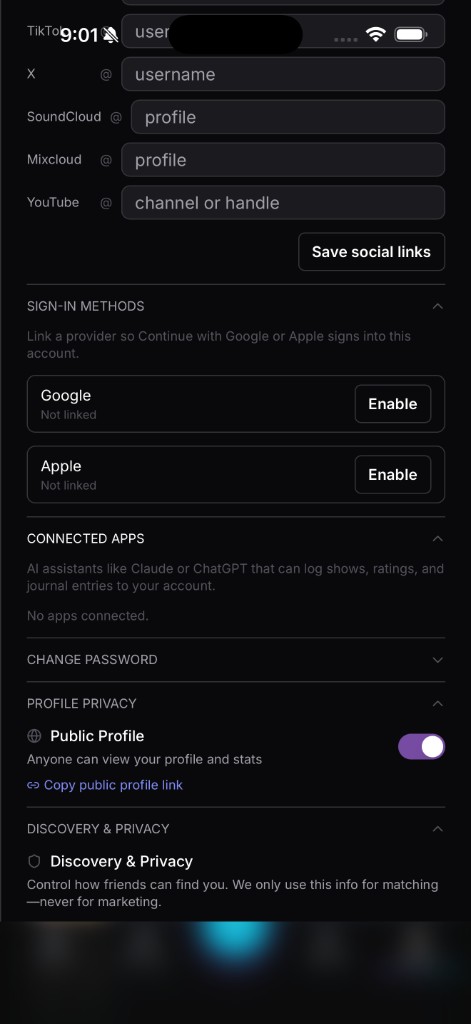
Setup takes three steps. Open SoundOff, go to Profile, then Settings, then Connected Apps. Pick Claude or ChatGPT. Approve the connection the same way you’d approve logging into any other app, a standard permission screen, no password typed into a chat window. That’s the whole setup, and it’s one-time.
What it’s actually doing: once connected, the assistant can read and write to your SoundOff account through conversation, the same actions you’d take by tapping around the app, just triggered by what you type. No new account, no separate login, it’s your existing SoundOff data.
Five prompts to try once you’re connected:
“Log the show I saw last night, [artist] at [venue].”
“Rate my [festival name] sets from this year against each other.”
“What’s the last thing I logged for [artist]?”
“Add a note to last night’s log: the opener played way longer than expected.”
“Search upcoming [artist] shows near me.”
What it can do: log a new set, add photos or notes to an existing one if you’ve shared them in the conversation, pull up your ranking history, search for upcoming events, and answer questions about your own logged shows. Basically the same things you’d do by hand in the app, routed through the chat.
What it can’t do: it won’t buy tickets, it won’t post anything publicly on your behalf without you asking it to, and it only works with the account you connected, not anyone else’s.
Where this actually earns its place is the in-between moments. You’re texting a friend about a show you just left, already describing it in your own words, and rather than switching apps to log it separately, you just paste that same description to the assistant and ask it to log the set. Or you’re mid-conversation about weekend plans and want a quick answer, “have I seen this artist before,” without breaking away to search the app yourself. It’s built for exactly that kind of moment, not as your primary way of using SoundOff.
If something doesn’t look right after the assistant logs a show for you, the fix is the same as anywhere else, open the entry in SoundOff directly and edit it. The assistant is a fast way in, not a separate system with its own rules. Everything it touches shows up in your journal exactly like a log you built by hand, ready to rank, tag, and share the normal way.
Revoking access is just as simple as setting it up. Back in Settings → Connected Apps, disconnect whichever assistant you no longer want linked, and access stops immediately. Nothing lingers.
This isn’t a replacement for the app, it’s a shortcut for the moments when typing a sentence is faster than tapping through screens. Head to Settings → Connected Apps to get it set up.