

Capture the night as it happens
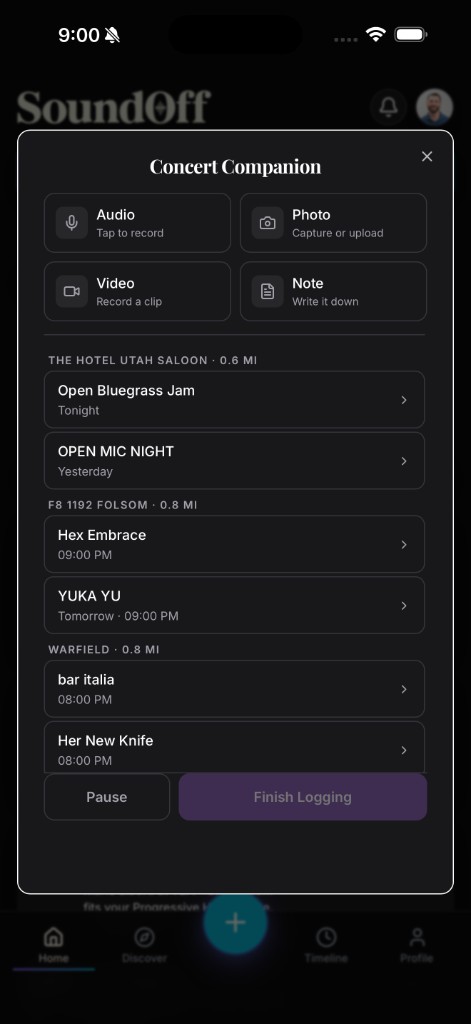
The details that make a good log good, what the crowd was like, which song surprised you, how the encore landed, don’t survive well until tomorrow. Concert Companion exists so you don’t have to rely on remembering them.
Start from the Capture bar on Home. It’s the fastest way in, one tap and you’re straight into Concert Companion without digging through menus while you’re standing in a crowd trying not to miss anything.
Inside, you’ve got a simple grid of options: photo, audio, video, or a quick text note. Grab whichever fits the moment. A photo of the stage or the marquee outside. A few seconds of audio if a song is hitting and you want to remember the sound of it, not just the setlist. A short video clip. Or just type a line, “opener was way better than expected,” before you lose the thought to the next song.
You don’t need to figure out which show this belongs to every time. Whatever you capture attaches to the right event automatically if you’ve already got it open, or gets queued to attach once you log the set, so a night’s worth of scattered captures ends up organized under one entry instead of loose in your camera roll.
Everything you capture through Companion is private by default, same as the rest of your journal. It’s yours to look back on first. Decide later, when you actually finish logging the set, whether any of it is something you want to share.
A practical note on using your phone at a show: nobody’s asking you to film the whole thing or spend the set staring at a screen. Concert Companion is built for quick captures, five seconds of audio, one photo, a couple of typed words, not a full recording session. The point is to grab just enough to jog your memory later, not to document every minute at the expense of actually being there.
If you forget to capture anything mid-set, that’s fine too. Companion is the ideal path, not the only one. You can still open Log Set afterward and add photos from your camera roll or type up notes from memory, same as always. Capturing live just means less reconstruction later and sharper details in the log you end up with.
Battery and signal are the two practical things worth planning around at a bigger venue or festival. A quick photo and a typed line barely touch your battery, but if you’re worried about running low over a long night, prioritize the note over the video clip, text costs you almost nothing and still captures the memory that matters most.
When the night’s winding down, or the next morning if that’s more realistic, open the entry and tap Finish Logging. That’s where the scattered captures, the photo from the opener, the audio clip from the encore, the note you typed at 11pm, come together into one complete log: artist, venue, date, and everything you grabbed along the way.
The whole point is timing. A photo taken during the show beats a photo you’re trying to remember to add three days later, every time. Tap Capture on Home next time you’re at a show, and let the log build itself while you’re actually there.