

Log Shows From Claude or ChatGPT
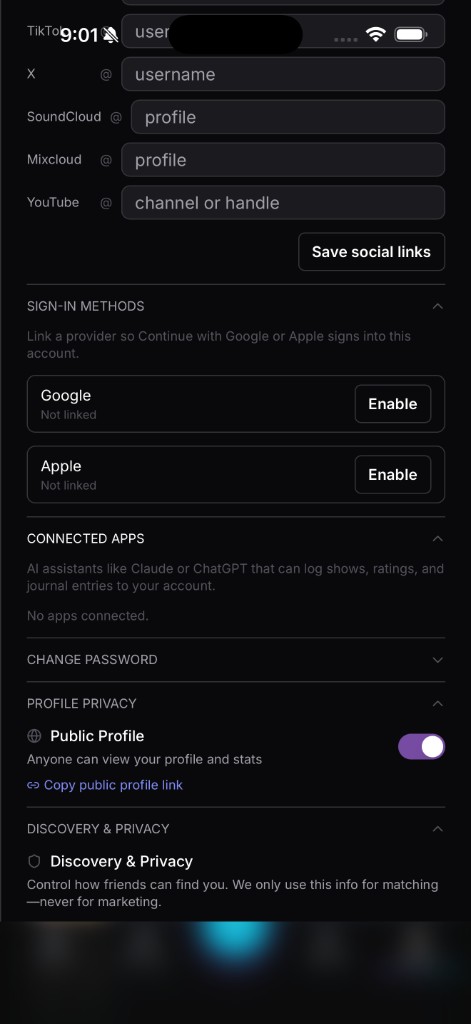
You’re probably already in an AI chat window more hours a day than you’re in any single app. Connected Apps meets you there instead of asking you to context-switch back to SoundOff every time you want to log a show.
Under the hood, this runs on MCP, short for Model Context Protocol, which is just a standard way for an AI assistant to securely talk to an app on your behalf. In plain terms: once you connect it, Claude or ChatGPT can read and write to your SoundOff account the same way the app itself does, only through conversation instead of taps.
Setup is a one-time OAuth connection. Head to Settings, then Connected Apps, choose Claude or ChatGPT, and approve the connection the same way you’d approve any other app login. No passwords change hands.
Once it’s connected, you can just talk to it. “Log the Bad Bunny show I saw last night at MetLife.” “Rate my Coachella sets from this year.” “What’s the last thing I logged for The Strokes?” “Journal a quick note about tonight’s opener.” The assistant handles the SoundOff side of it and reports back.
You’re in control of that connection at all times. Revoke it from Settings whenever you want, and access stops immediately, no lingering permissions. Connected Apps isn’t a replacement for the app, it’s a shortcut for the moments when opening it isn’t the fastest path to getting a show logged.
Head to Settings → Connected Apps to set it up.