

Plan shows with your crew
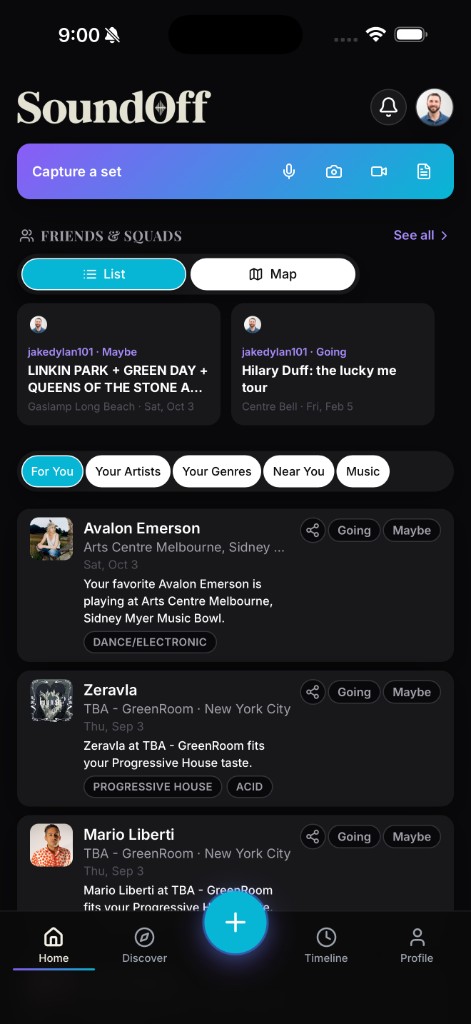
A show is better with people you know there, and deciding who’s going shouldn’t require a separate group chat and a screenshot of the lineup. SoundOff builds crew planning into the same flow as everything else.
On Home, the Friends & Squads row shows you who’s connected to upcoming shows near you at a glance. Switch between a list view, good for scanning names quickly, and a map view, good for seeing where the action actually is relative to you. Either way, you’re looking at real RSVPs: friends who’ve marked Going or Maybe on events you can also see, not a guess based on who follows who.
Adding people is straightforward and doesn’t require them to already have an account. Invite friends directly if you know they’re not on SoundOff yet, or connect with people who already are. Once you’re linked, their Going and Maybe marks start showing up on the shows you’re both looking at, which is often what turns “maybe I’ll go” into an actual plan.
Beyond one-on-one friends, Sound Squads are group-based. Join a squad built around a scene, a city, or a shared taste, and you’ll see squad activity layered into your Discover picks alongside your direct friends. It’s a way to plan with a wider circle than just the people you already know personally, useful if you’re new to a city’s live music scene or want to meet people who go to the same kind of shows you do.
The map view is worth a specific mention if you’re deciding between a couple of shows on the same night. Seeing where your friends are actually clustered, three of them Going to a venue across town versus one at a spot ten minutes from you, can make a decision that felt like a toss-up pretty obvious. It’s a small feature, but it answers the question group texts usually take twenty messages to settle.
None of this requires everyone in your crew to be equally active on SoundOff, either. If you’re the one who logs consistently and your friends mostly don’t, you can still invite them to a specific event without asking them to build out a full profile first. The invite itself is often what gets someone to finally download the app and start their own journal.
After the show, Tag Yourself closes the loop on the social side. If a friend logged the night before you did, request to be tagged on their entry instead of creating a duplicate. They approve or decline, keeping control over who’s associated with their post. And once it’s tagged, that connection shows up in your Activity feed too, media-forward, easy to scroll, proof that the crew actually made it out together.
None of this replaces the group chat entirely. But it puts the actual RSVP data, who’s really going, not just who said they might, in the same place you’re already deciding what to do this weekend.
Head to Discover and find your people. The next show is better with company.