

Share your night out
There are two different moments worth sharing around a show: before it happens, when you want people to know you’re going, and after, when you want to show what it actually was. SoundOff has a purpose-built card for each, so neither one turns into an awkward screenshot.
Before the show, event story cards handle the “I’m going” moment. RSVP to an event from the Home feed, Discover, or your profile’s upcoming shows, and share generates a clean vertical card with the artist, venue, and date, styled for a social story rather than looking like a ticket confirmation someone forwarded you. It’s built for your social channels (Instagram, TikTok, Snap, etc.), sized right and ready to post without any cropping.
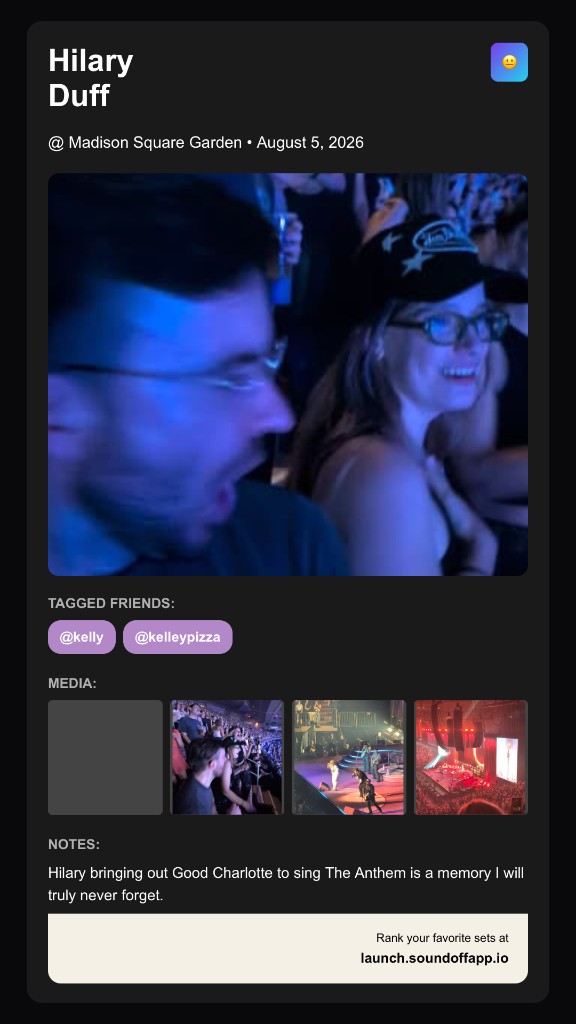
After the show, sharing works from the set itself once it’s logged. Open the entry and the same kind of card pulls together whatever you captured, the photo or clip you added, plus the artist, venue, and any notes you want visible. This is the recap version, less “I’m going” and more “here’s what that actually looked like,” and it works the same way across your social channels (Instagram, TikTok, Snap, etc.).
Not every share needs to be a story card. If you just want to send a friend a direct link to an event or a set, without the visual card, copy link sits right next to the share button on both flows. Same content, no image required, useful for a text message instead of a public post.
A quick way to think about timing: share the event card when you want your crew to see you’re excited before it happens. Share the set card afterward when you actually have something to show, the photo, the crowd, the proof you were there. Both live one tap from wherever you’d expect them, no separate app or export step in between.
Where you’re sharing from matters a little, too. Sharing straight from the Home feed or Discover works well for events you just found and want to react to in the moment. Sharing from your own upcoming shows on your profile is better once you’ve committed and want a cleaner, more personal announcement, it’s your list, not a feed you’re reacting to. Neither is more “correct” than the other, it’s just a matter of what the moment calls for.
One more thing worth saying plainly: sharing is optional at every step. Plenty of people log shows and rank them without ever posting a card publicly, and that’s a completely normal way to use SoundOff. The share tools are there for the nights you want to talk about, not an obligation attached to every log.
If you’d rather test a share card before deciding whether to post it, nothing forces your hand. Generate the card, look at it, and back out if it’s not what you wanted, no draft gets posted automatically just because you tapped share.
RSVP to something coming up, or open a set you’ve already logged, and share it. It takes less time than writing a caption from scratch.